Skip to content

Introduction

Task Objectives

  • This page has the salesforce versions and external guides.
  • How to differentiate between the versions

1. Salesforce - Version 1-Legacy

Integration Guide https://www.salesforce.com/products/free-trial/developer](https://help.webex.com/en-us/article/nhxw7kfb/Integrate-Webex-Contact-Center-with-Salesforce-(Version-1%E2%80%94Legacy)/
Latest Updates https://help.webex.com/en-us/article/nhxw7kfb/Integrate-Webex-Contact-Center-with-Salesforce-(Version-1%E2%80%94Legacy)#concept-template_ac93b49e-a5eb-4942-a734-26c8da471aae/

2. Salesforce - Version 2-New

Integration Guide https://help.webex.com/en-us/article/dyidod/Integrate-Webex-Contact-Center-with-Salesforce-(Version-2-New)/
Access Guide https://help.webex.com/en-us/article/n08vfjcb/Access-and-use-Webex-Contact-Center-within-Salesforce-(Version-2-New)/
Latest Updates https://help.webex.com/en-us/article/dyidod/Integrate-Webex-Contact-Center-with-Salesforce-(Version-2-New)#concept_d3z_st5_hgc/

3. Differentiate between versions

Guide https://techzone.cisco.com/t5/Contact-Center-3rd-Party/Playbook-CRM-Connector-Version-Matrix-Install-Store-Link/ta-p/16910365/

4. Installated Package Verification

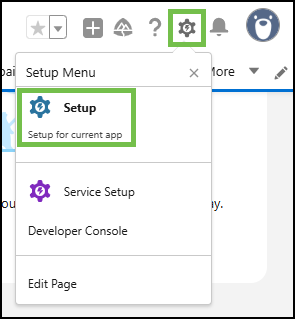
  • In Salesforce, navigate to 'Setup' by clicking the gear icon in the top-right corner and selecting 'Setup'.
Nav

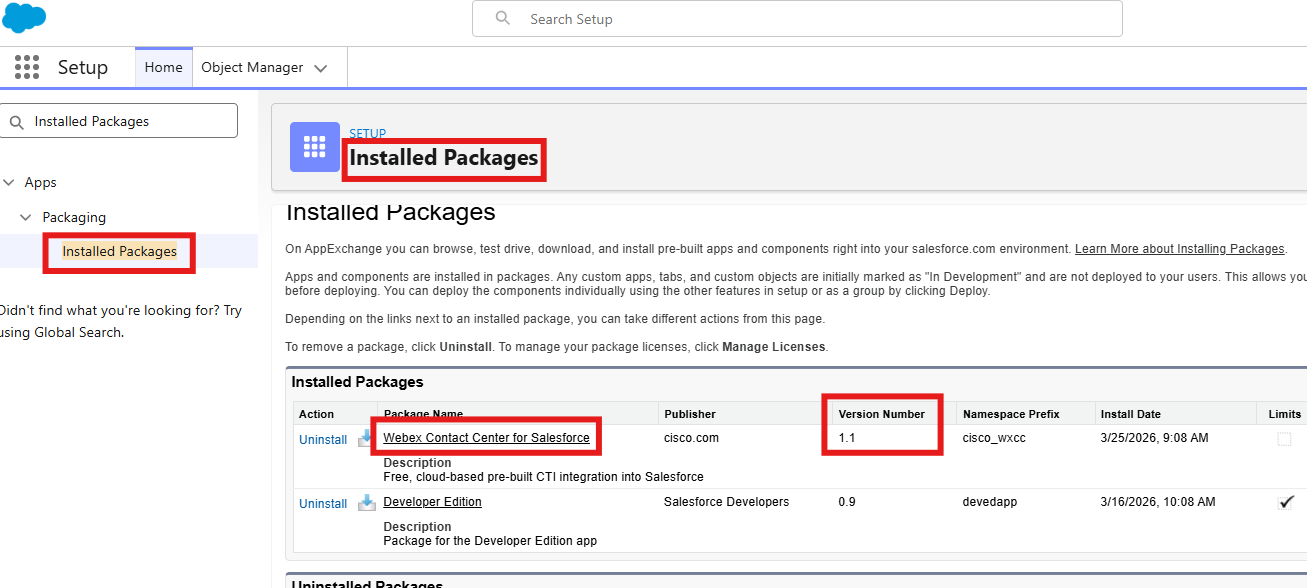
  • In the Salesforce portal, navigate to Apps > Packagin > Installed Packahges (or type Installed Packages in the search bar above the left-hand menu).
Nav